Scrolling text ticker
Drive the 8x8 grid as a marquee that scrolls messages, clocks, or notifications one column at a time.
An 8x8 grid of 64 chainable WS2812B RGB LEDs, each with a built-in controller, driven over a single 5V data wire.
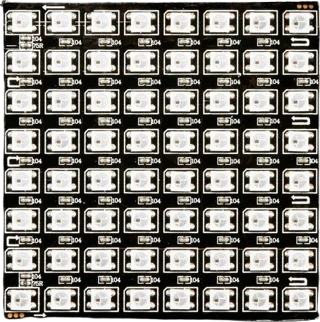
The WS2812B 8x8 matrix packs 64 individually addressable RGB LEDs into a 65 x 65 mm board. Each pixel is a 5050-package WS2812B that combines a red, green, and blue die with an integrated control IC, so the whole panel is driven from one microcontroller pin instead of 192 separate connections. Every LED runs 8-bit PWM per color channel, giving 256 brightness levels per channel and roughly 16.7 million possible colors per pixel.
The 64 pixels are wired as a single cascade. Data enters at DIN, each pixel latches the first 24 bits (in GRB order) as its own color, then reshapes and forwards the remaining bits out of DOUT to the next pixel. Communication uses a single-wire, self-clocking NRZ protocol at 800 Kbps, where a 0 and a 1 are distinguished by how long the line stays high inside each roughly 1.25 us bit. Holding the data line low for longer than the reset time (greater than 50 us) latches the frame and makes all pixels display their loaded values at once.
The panel runs on 5V (the WS2812B operates from about 3.5V to 5.3V). Each pixel can draw close to 60 mA at full white, so all 64 lit at maximum white can pull nearly 3.8A, far more than an Arduino 5V pin can source. Because the data-line logic-high threshold is about 0.7 x VDD (roughly 3.5V at a 5V supply), a 3.3V microcontroller output sits near or below that threshold and usually needs a level shifter for reliable color.
| Pin | Function | Type |
|---|---|---|
VCC +5V | Power | Power in |
GND GND | Power | Power in |
DIN DIN | Digital · 1-Wire WS2812 | Digital input |
DOUT DOUT | Digital · 1-Wire WS2812 | Free |
Verified from the Tinkered component library · CJMCU / Generic.
The WS2812B RGB Matrix 8×8 connects to any of the microcontrollers supported in Tinkered. Mind the 5 V logic level on 3.3 V boards.
Data only flows one direction, from DIN to DOUT. Connecting the microcontroller to DOUT, or chaining a second panel backward, leaves the matrix dark. Follow the on-board arrow and drive DIN.
At a 5V supply the data-high threshold is about 3.5V, so a 3.3V pin is marginal. It may work on the bench and then flicker, glitch, or show wrong colors. Use a level shifter (or power the panel at a slightly lower 5V) for reliable output from ESP32, Pi, or STM32.
All 64 pixels at full white draw close to 3.8A. Running that through the Arduino 5V pin or thin jumper wires causes brownouts, dimming, and color shifts. Use a proper 5V supply and cap software brightness if the supply is small.
WS2812B latches data in GRB order, not RGB. Initializing the library with the wrong order swaps red and green. Set the strip type to GRB (the default in most NeoPixel libraries) so colors match what you request.
Omitting the input capacitor and the data-line resistor leaves the first pixel exposed to inrush current and voltage spikes at power-up, which can kill it and break the whole chain downstream. Add both at the panel input.
Drive the 8x8 grid as a marquee that scrolls messages, clocks, or notifications one column at a time.
Map 8x8 bitmaps to the 64 pixels for icons, emoji, and looping animations, a natural fit for the single-wire frame update.
Feed FFT or level data to the columns for a reactive sound visualizer that lights up with music.
Build Snake, Tetris, or Conway's Game of Life where the 8x8 matrix is the playfield and each pixel is a cell.
Show weather, CPU load, or notification colors at a glance using per-pixel brightness and color mixing.
Drop the WS2812B RGB Matrix 8×8 into a circuit, write firmware, and simulate it in your browser, then deploy to real hardware. All in one editable Tinkered project.